All weeks · Worksheet · Overview · Hardening notes

Week 13 · Lecture slides

Week 13

Contents19 sections

Cloud & Container Security

Software Security · Nutthakorn Chalaemwongwan


Today

  • Shared-responsibility model
  • IAM (who can do what) & least privilege
  • Secrets management
  • Container/image hardening
  • 🎮 Game: Misconfig Hunt

Recap & framing

  • Supply chain → what you build with
  • Today → where you run it
  • OWASP A02:2025 Security Misconfiguration (now #2)
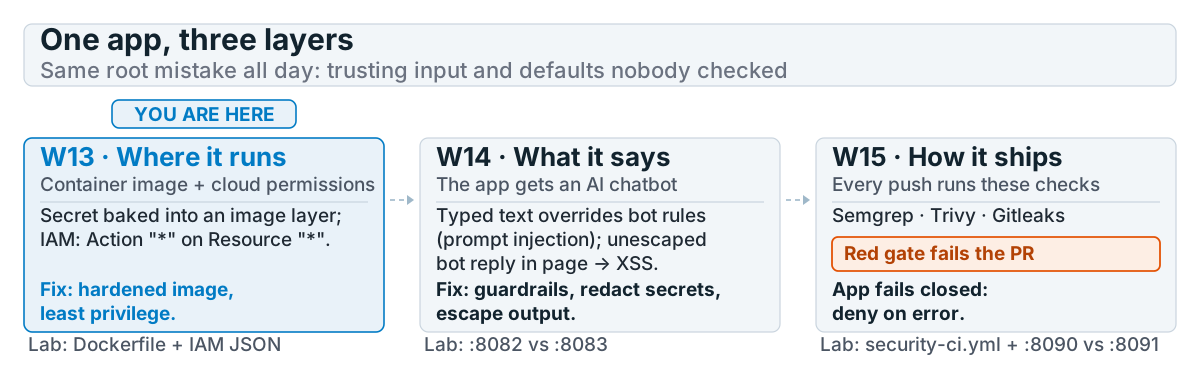
One app, three layers. You are here: W13. W13, where it runs: a secret baked into an image layer and an IAM policy with Action * on Resource *; fix with a hardened image and least privilege. W14, what it says: the app gets a chatbot; typed text overrides its rules (prompt injection) and its reply goes into the page unescaped (XSS); fix with guardrails, secret redaction and output escaping. W15, how it ships: Semgrep, Trivy and Gitleaks check every push, a red gate fails the PR, and the app denies on error.


Shared responsibility

  • The provider secures the cloud itself; you secure what you put in it
  • Misconfig — not provider bugs — causes most breaches
  • Defaults are rarely safe

Whose job is it?
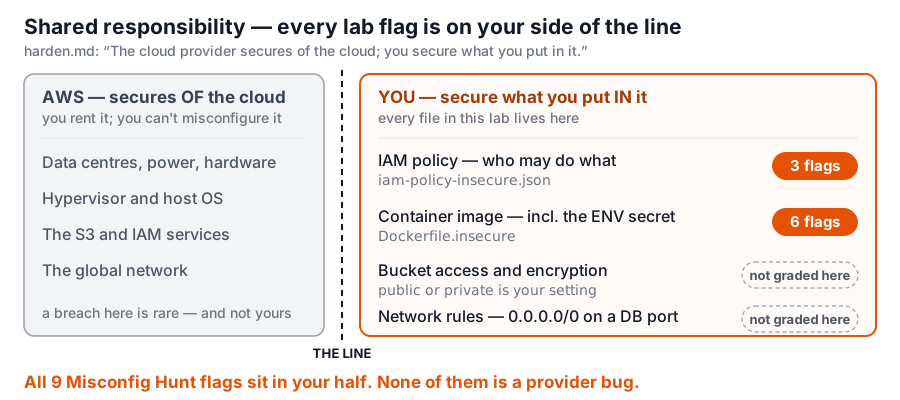
Shared responsibility for this lab's S3-backed app as two panels split by a line. AWS secures OF the cloud: data centres and hardware, the hypervisor and host OS, the S3 and IAM services themselves, the global network. You secure what you put IN it: the IAM policy (iam-policy-insecure.json, 3 flags), the container image (Dockerfile.insecure, 6 flags including the ENV secret), bucket access and encryption, and network rules such as 0.0.0.0/0 on a database port. Conclusion: all 9 Misconfig Hunt flags sit in your half; none is a provider bug.


IAM & least privilege

{ "Effect":"Allow", "Action":"*", "Resource":"*" }   // 🚩
  • Read a statement as: Effect (allow or deny) · Action (what) · Resource (on which thing) · Condition (only when …)
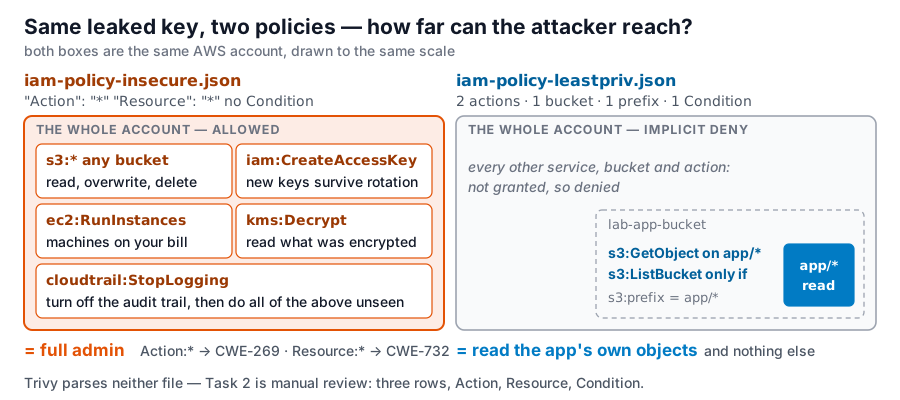
  • Resource:"*" → CWE-732, Action:"*" → CWE-269: graded as two findings on the same policy
  • Fix: use two statements for one bucket. Allow s3:GetObject on app/*. Allow s3:ListBucket only when the s3:prefix Condition matches app/*
Two findings, one statement: Action vs Resource wildcards (Week 13) — open full size

If the key leaks — blast radius

The same AWS account drawn twice at the same scale. Left, iam-policy-insecure.json (Action star, Resource star, no Condition): the whole account is allowed, with example actions a leaked key can now run — s3 star on any bucket, iam:CreateAccessKey to mint new keys that survive rotation, ec2:RunInstances on your bill, kms:Decrypt, cloudtrail:StopLogging to turn off the audit trail — equals full admin; Action star is CWE-269, Resource star is CWE-732. Right, iam-policy-leastpriv.json: everything is implicitly denied except a small app/* square inside lab-app-bucket, readable via s3:GetObject on app/* objects, plus s3:ListBucket only under the Condition s3:prefix = app/*. Trivy parses neither file; Task 2 is manual review.


Secrets management

  • Secrets in env vars / Dockerfile / git = leaked
  • Use a secrets manager / vault; rotate
  • Scan history (Gitleaks) — recall Week 2

Where the ENV secret ends up
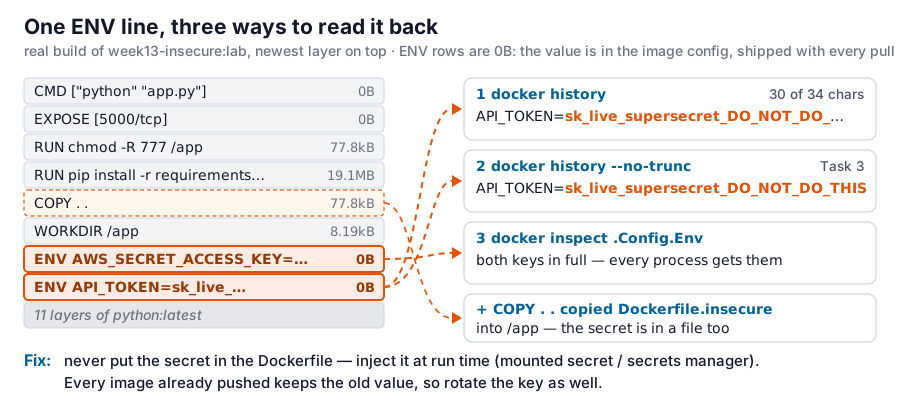
From a real build of week13-insecure:lab, the image history as a stack with the newest layer on top: CMD, EXPOSE, RUN chmod -R 777, RUN pip install, COPY dot dot, WORKDIR, then ENV AWS_SECRET_ACCESS_KEY and ENV API_TOKEN, both 0 bytes because the value lives in the image config, then the python:latest base layers. Arrows to three readouts: plain docker history still prints sk_live_supersecret_DO_NOT_DO_ (30 of 34 characters); docker history --no-trunc prints the whole token (the Task 3 command); docker inspect .Config.Env prints both keys in full. A fourth arrow: COPY dot dot copied Dockerfile.insecure itself into /app, so the secret is in a file too. Fix: never put the secret in the Dockerfile, inject it at run time, and rotate the key because every pushed image keeps the old value.


Try it — which layer gives it away?

Real docker history / docker inspect output from both lab images. Start with docker history --no-trunc and compare the ENV rows.

Which layer gives the secret away? docker history, real output (Week 13) — open full size

Storage & network exposure

  • Public buckets, open ports, default creds
  • Encrypt at rest + in transit
  • Private by default; explicit allow

Container image hardening

# 1. Dockerfile misconfigs   2. known CVEs in the built image
docker run --rm -v "${PWD}:/src" aquasec/trivy:latest \
  config --severity MEDIUM,HIGH,CRITICAL /src
docker run --rm -v /var/run/docker.sock:/var/run/docker.sock \
  aquasec/trivy:latest image --severity HIGH,CRITICAL week13-hardened:lab
  • Two stages: build in python:3.11-slim, run in distroless (no shell, no package manager) as user 65532, not root
  • Pin by digest (@sha256:...): a tag can be moved later, a digest cannot
  • Trivy finds only 3 of the 6 defects. COPY . ., chmod -R 777 and unpinned pip install: read the file

Does Trivy see it?

Start with fix only what Trivy flags: Trivy says 0, but 3 defects are still in the file. Then fix the rest one at a time.

Six defects, one scanner: which ones does trivy config see? (Week 13) — open full size

Kubernetes basics (awareness)

  • Pod security (a pod = one or more containers run together), network policies, RBAC (role-based access control)
  • Don't run privileged; limit service-account tokens

Same app, shipped twice
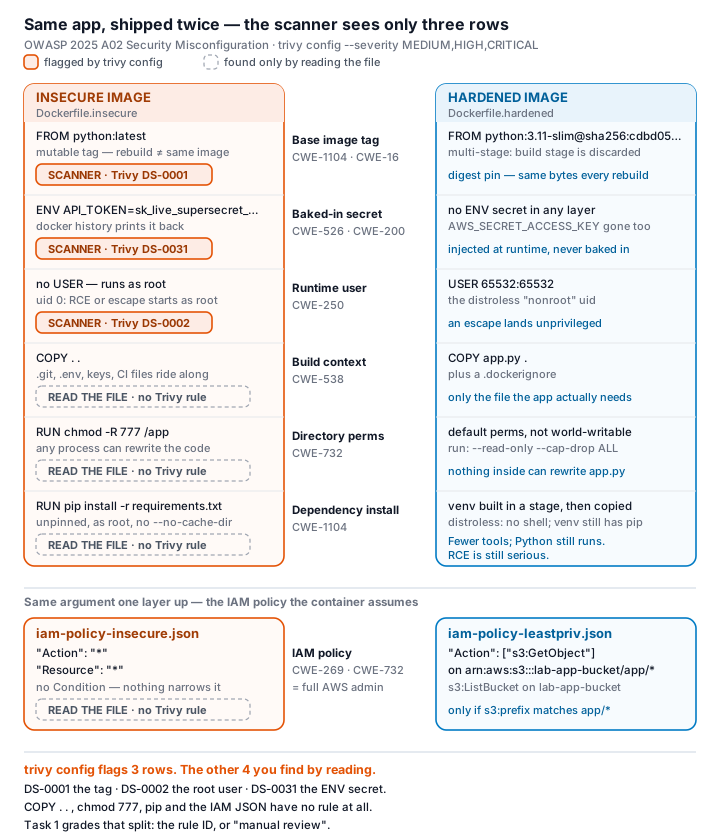
The same app as two container images side by side, insecure vs hardened, six layers compared: mutable :latest tag vs a pinned digest, a baked-in secret vs runtime injection, root user vs distroless non-root, COPY-everything vs a minimal context, world-writable permissions vs read-only, and an unpinned pip install vs a discarded build stage. Below both, the same argument one layer up: the wildcard IAM policy vs the scoped one. The conclusion: Trivy flags only three of the seven defects shown here — the tag, the root user, and the secret. COPY .., chmod 777, the unpinned install, and the IAM JSON all need manual review; there is no rule for any of them.


🔍 Game — Misconfig Hunt

9 flags — each misconfiguration found + explained = a flag:

  1. Container (6): :latest tag, root user, secret-in-ENV, COPY . ., chmod -R 777, unpinned pip install
  2. IAM (3): Resource:"*" (CWE-732), Action:"*" (CWE-269), missing Condition scoping

Deliverable

📋 Worksheet 13 — labs/week13-cloud-container/worksheet.md (Parts 1–4) · start: bash scan.sh (it scans the Dockerfiles only — read the IAM JSON yourself)

  • Before/after IAM policy + Dockerfile, all 9 flags explained
  • Trivy results before/after (container part only)
  • A short note: how to remove and rotate the leaked secret
  • + Audit the AI / EiPE / Prompt Problem (see worksheet)

Key takeaways

  • Misconfiguration > zero-days as a breach cause
  • Least privilege, private-by-default, no secrets in code
  • Scan infrastructure-as-code (IaC) files and images in CI

Questions?

Next week: AI / LLM application security

All weeks in Software Security 2 (KOSEN)