Security Mindset & Threat Modeling
Software Security · Nutthakorn Chalaemwongwan
Today
- What "secure" means (CIA)
- Attacker vs. defender mindset
- Trust boundaries & attack surface
- STRIDE + the OWASP/MITRE landscape
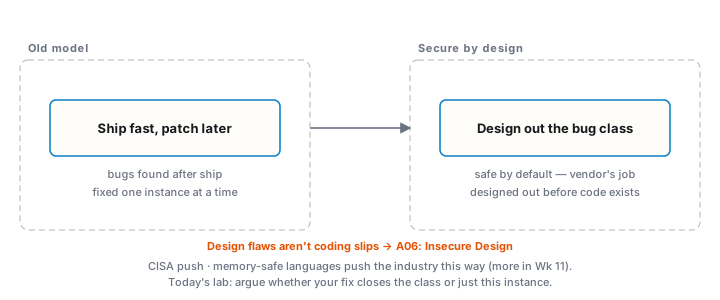
- Secure by Design
- 🎲 Game: Elevation of Privilege · Lab 0 setup
How this course works
- Every week: lecture concept → hands-on game/lab
- You'll break sandbox targets and defend your own code
- Per-student flags · live scoreboard · weekly "Audit the AI"
- Ethics first: attack only provided targets (see
ETHICS.md)
What does "secure" mean?
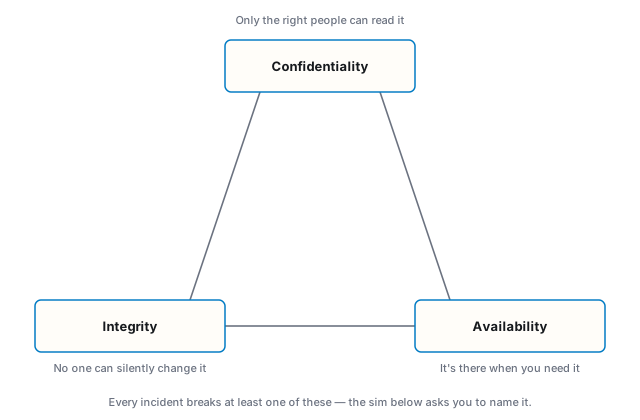
Security is not a feature you add — it's a property you design for.
Classify the incident
Six real-shaped incidents. Guess the property before the reveal — most classes call one out loud before the buttons are even clicked.
Attacker vs. defender mindset
- Defenders must close every hole
- Attackers need one
- Think in abuse cases, not just use cases
- "What can go wrong here?" at every boundary
Trust boundaries & attack surface
- Trust boundary: where data crosses between components of different privilege
- Attack surface: every input an attacker can reach
- HTTP params, headers, cookies, file uploads, APIs, env vars, dependencies
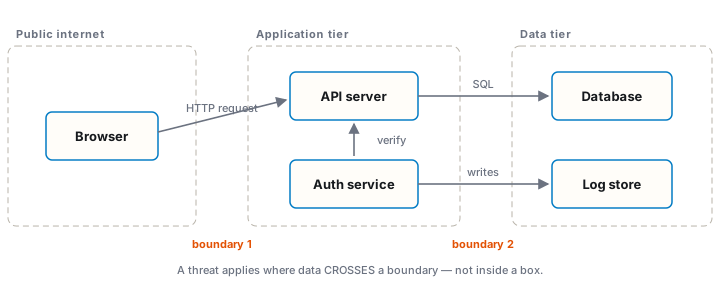
Worked example: the /upload endpoint
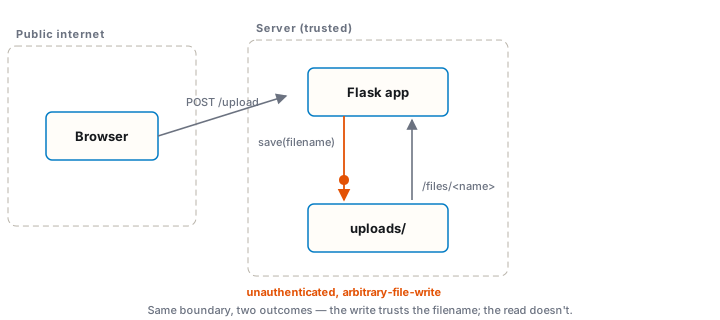
- Crosses the Internet → app trust boundary
- Inputs: the file bytes and the filename (attacker-controlled)
../../escaped.txtas a filename → the app saves it there — arbitrary-file-write, unauthenticated, anywhere the process can reach (not "overwrite a same-name file" — write to a path you chose)/files/<name>(the read path) is comparatively well-defended — the same trick doesn't work against it
Try it — same input, opposite outcomes
Type a filename below, or pick a preset. The resolved path is computed live, not looked up.
STRIDE
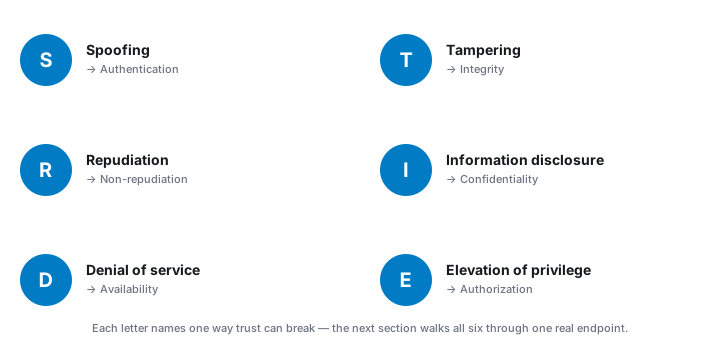
STRIDE applied to /upload
- S — no auth: anyone can upload as "anyone"
- T —
../filename writes outsideuploads/— arbitrary-file-write, not just an overwrite - R — no logs → can't prove who uploaded the malware
- I — the read path (
/files/<name>) is comparatively well-defended (Werkzeug blocks traversal there) — this element's real risk is on the write side, not this letter - D — no size limit → fill the disk
- E — upload
shell.php, then request it → code execution
Now without the bullet list
Same six findings, letters hidden. Guess before it reveals.
The landscape you'll use all term
- OWASP Top 10 (2025) — most critical web risks
- OWASP LLM Top 10 (2025) — AI app risks
- MITRE CWE — catalogue of weaknesses (this week's finding maps to CWE-501, Trust Boundary Violation)
- MITRE ATT&CK — adversary tactics & techniques
Secure by Design
🎲 Game — Elevation of Privilege
- Microsoft's free STRIDE card deck — github.com/adamshostack/eop
- Play cards against the sample app's data-flow diagram
- Each valid threat tied to a real element = a point
- Outcome: a team-built STRIDE model
- No printer? Worksheet Task 3 has a built-in digital deck — same 78 cards, one shared screen
Lab 0 — Environment setup (once)
- Docker Desktop (Win/macOS/Linux) — runs every lab target
- Browser + proxy: Burp Suite Community or OWASP ZAP
- Toolbox container (for W11 + recon):
docker build -t softsec-toolbox labs/toolbox - Optional fallback: a Kali/Ubuntu VM if your host can't run Docker
- Verify:
docker run hello-world,git --version
Lab 1 — Threat-model a sample app
📋 Worksheet 1 —
labs/week01-threat-modeling/worksheet.md(Part 3) · kickoff:docker compose up→ http://localhost:8080
- Run the app; draw a DFD; apply STRIDE to each element
- Abuse cases: 2 personas × 2 abuse cases
- Deep-dive the
/uploadpath-traversal finding - Systems-level pass: assume one element is owned — what does it reach? Chain two low findings into one system-level claim
- Turn threats into testable security requirements ("the system must … so that …")
- NoteVault (term project): DFD + top-3 threats — this kicks off your project
- Rank top 5 risks (likelihood × impact)
- Defend: implement one real mitigation — diff, before/after evidence, and argue whether your fix closes the bug class or just this instance
Using AI in this course
- AI is allowed — and you must disclose how you used it
- But AI hallucinates APIs/CVEs and writes insecure code
- You're graded on understanding, not the answer:
- random live re-demos — explain it or score zero
- your flags are unique to you — copying is traceable
- every lab has an "Audit the AI" task: find what its answer gets wrong
- Use AI to learn faster — never to skip the thinking
Key takeaways
- Design for security; don't bolt it on
- Attackers need one gap — model the whole surface
- STRIDE + DFD = a repeatable way to find design flaws
Questions?
Next week: Secure SDLC, tooling & fuzzing