Course: Software Security (KOSEN69) · Week 2 Aligned to: OWASP 2025 (A05 Injection [CWE-89, CWE-78], A04 Cryptographic Failures [CWE-327], A02 Security Misconfiguration [CWE-798, CWE-489]) · CWE-798, CWE-89, CWE-78, CWE-327, CWE-489 Signature game: "Bug Triage Race" (scan → triage; score = true positives − misclassified)
Ethics note: The scanners run only against the provided
vulnerable-repo/on your own machine. Do not point SAST/secret scanners at third-party repos or production systems without authorization. Treat any secret you find here as fake lab data.
Part 1 — Student Information
| Name | Student ID | Date | Group |
|---|---|---|---|
Part 2 — Lecture Questions
Answer in your own words (2–4 sentences each).
- Distinguish SAST, DAST, and SCA — what does each see, and when in the SDLC does each run?
- What is secret scanning, and why do hardcoded secrets keep ending up in repos?
- What does "shift-left / DevSecOps" mean in practice for a CI pipeline?
- Why is coverage-guided fuzzing considered the dominant modern bug-finding technique?
- Define true positive vs. false positive in scanner triage, and why misclassifying both directions is costly.
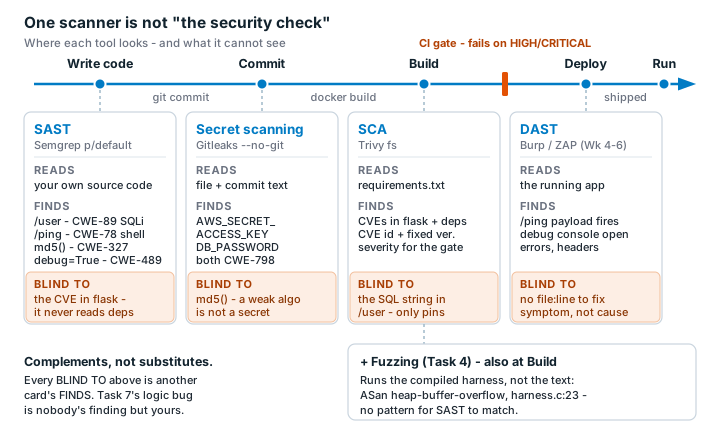
Part 3 — Hands-on Lab (180 min)
Learning goals: run a SAST tool and a secret scanner, triage findings by CWE/severity, and remediate real flaws. Prerequisites: Docker installed; internet to pull the Semgrep/Gitleaks images.
Environment setup
cd labs/week02-sdlc-tooling
cat scan.sh                 # see exactly what it runs
bash scan.sh                # Semgrep (p/default + p/owasp-top-ten) then Gitleaks on ./vulnerable-repo
Target under scan: vulnerable-repo/app.py (plus requirements.txt). It contains five planted flaws.
What to submit per task: the command/payload run + a screenshot of the finding + a 2–3 sentence mitigation.
Task 0 — Onboarding (5 min) · Goal: confirm tooling. Steps: run bash scan.sh; confirm both Semgrep and Gitleaks sections produce output. Deliverable: screenshot showing both tools ran.
Task 1 — SAST sweep with Semgrep (25 min) · Goal: find code flaws. Steps: read the Semgrep output; locate the SQL injection in /user (CWE-89, string-formatted query), the OS command injection in /ping (CWE-78, shell=True), the weak md5 password hash (CWE-327), and debug=True (CWE-489). Deliverable: one screenshot per finding with the file:line.
Task 2 — Secret scan with Gitleaks (15 min) · Goal: find leaked credentials. Steps: read the Gitleaks output; identify AWS_SECRET_ACCESS_KEY and DB_PASSWORD (CWE-798). Deliverable: screenshot + the rule that fired for each.
Task 3 — Bug Triage Race (30 min) · Goal: triage accurately. Steps: build a table with columns Tool | File:Line | CWE | Severity | TP/FP | Fix idea; mark at least 3 true positives and 1 likely false positive and justify each. (Score = TP − misclassified.) Deliverable: the completed triage table.
Task 4 — Fuzzing intro (10 min) · Goal: see coverage-guided fuzzing find a bug SAST won't. Steps: in the labs/toolbox container (Apple clang has no libFuzzer runtime), build clang -g -fsanitize=address,fuzzer harness.c -o fuzz, then seed the corpus and run it: mkdir -p corpus && printf 'FUZ' > corpus/seed && ./fuzz corpus. It crashes almost immediately with an AddressSanitizer heap-buffer-overflow at harness.c:23 (the data[3] read with no size > 3 check). Seeding matters: an unseeded ./fuzz has to rediscover the magic bytes by chance and often finds nothing for minutes — that unpredictability is itself worth a sentence in your write-up. (The deep fuzzing+exploit lab is Week 11.) Deliverable: the ASan crash output (or a screenshot) + a 2-sentence note on why fuzzing finds this bug when a linter/SAST pass over the same 4-line check would not.
Task 5 — Scan the project target (40 min) · Goal: apply the tools to your term project. Steps: run Semgrep + Gitleaks against NoteVault (../../project/starter-app); also run an SCA scan: docker run --rm -v "$PWD/../../project/starter-app:/src" aquasec/trivy fs /src. Deliverable: a findings list (tool, file:line/CVE, CWE) — reuse it in your project vuln report.
Task 6 — Build a security CI gate (25 min) · Goal: automate the scan (previews Week 15). Steps: adapt ../week15-devsecops-pipeline/security-ci.yml into a workflow that runs Semgrep + Trivy + Gitleaks and fails on HIGH/CRITICAL; run it locally (act) or commit to your fork and read the Actions log. Deliverable: the workflow file + a screenshot of a failing run.
Task 7 — SAST blind spots (20 min) · Goal: see what scanners miss. Steps: find one real bug in vulnerable-repo/app.py (or NoteVault) that Semgrep did not flag, and explain why a pattern-based tool missed it. Deliverable: the bug + a 2-sentence explanation.
Task 8 — Defend / fix it (10 min) · Goal: remediate the planted flaws in vulnerable-repo/app.py. Steps: rewrite /user to use a parameterized query (? placeholder); remove shell=True and pass an argument list in /ping; move both secrets to environment variables; replace md5 with bcrypt/argon2; set debug=False. Deliverable: a before/after diff for each fix mapped to its CWE.
Part 4 — Reflection
- Map two of your findings to their CWE and to the matching OWASP 2025 category.
- Name a real-world breach caused by a hardcoded/leaked secret or an injection flaw, and what control would have caught it pre-release.
- Which single tool (SAST vs. secret scanning) gave the highest-value findings on this repo, and why?
Grading rubric (100)
| Criterion | Points |
|---|---|
| Lecture questions (Part 2) | 20 |
| Exploitation + evidence (scan output + triage table + screenshots) | 40 |
Defense (remediated app.py with before/after diffs) | 25 |
| Reflection (CWE/OWASP mapping + breach + tool value) | 15 |
Evidence & Integrity (required)
- Identity proof: every screenshot/diagram must show a terminal running
printf '%s | %s | ' "$(whoami)" '<YOUR-STUDENT-ID>'; date '+%F %T %Z'in the same image as the evidence. When the evidence is a browser page, a DevTools panel or a rendered response, put that terminal beside the browser and capture the whole screen — a cropped window carries nothing that identifies you, and the lab's own output is byte-identical for the whole cohort by design, so the stamp is the only thing that makes the shot yours. Generic or borrowed evidence is not accepted. - Personalized flag: N/A — this week has no arena challenge, so no flag is issued. Leave this blank.
- Explain in your own words (graded on your reasoning, not copied text):
- What did you do, and why did the vulnerability work?
- Why does your fix actually stop it — and what could still break it?
🤖 Audit the AI (required)
AI is a power tool you must distrust — you are graded on your critique, not the AI's answer.
- Ask an AI assistant to exploit or fix this week's vulnerability. Paste its full answer.
- Find what's wrong or risky in it — insecure code, a subtly incomplete fix, a hallucinated API/function/CVE, a missed edge case, or wrong reasoning. Quote the exact line(s).
- Produce the correct, verified version yourself and explain in 2–3 sentences why the AI's output was insufficient.
Disclose your AI use in the Part 1 table. This task counts toward your Defense + Reflection score.
🧠 Comprehension & Prompt (required)
A. Explain in Plain English (EiPE). In 2–3 sentences, in your own words, describe what this week's vulnerable code/endpoint actually does and why it is exploitable — explain the mechanism, don't dump jargon.
B. Prompt Problem. Write a single prompt that makes an AI produce a correct, secure fix for one finding. Run it: does the exploit now fail? If not, refine the prompt and try again. Submit the final prompt + the verified result. Graded on the prompt's precision and your verification — this trains problem decomposition and AI literacy (Denny et al. 2024).