Week 13 · worksheet

Worksheet 13 — Cloud & Container Security (4 hrs)

← all weeks · readme · harden · slides

Worksheet 13 — Cloud & Container Security (4 hrs)

Course: Software Security (KOSEN69) · Week 13 Aligned to: OWASP 2025 A02 Security Misconfiguration · CWE-732 (incorrect permission assignment), CWE-16 (configuration), plus CWE-798, CWE-250, CWE-538, CWE-269, CWE-1104 Signature game: 🔍 Misconfig Hunt (CloudGoat-style) — each misconfig you find and fix = a flag.

⚠️ Ethics note: All artifacts here are deliberately broken for teaching and are marked "Sandbox/teaching only; for authorized lab use." Scan, exploit, and harden only these lab files (or systems you own / are authorized to test). Never point Trivy or these techniques at third-party cloud accounts or images without written permission.


Part 1 — Student Information

NameStudent IDDateGroup

Part 2 — Lecture Questions

Answer in your own words (2–4 sentences each).

  1. Explain the shared-responsibility model. In harden.md it says "the cloud provider secures of the cloud; you secure what you put in it." Give one concrete example of each side for an S3-backed app.
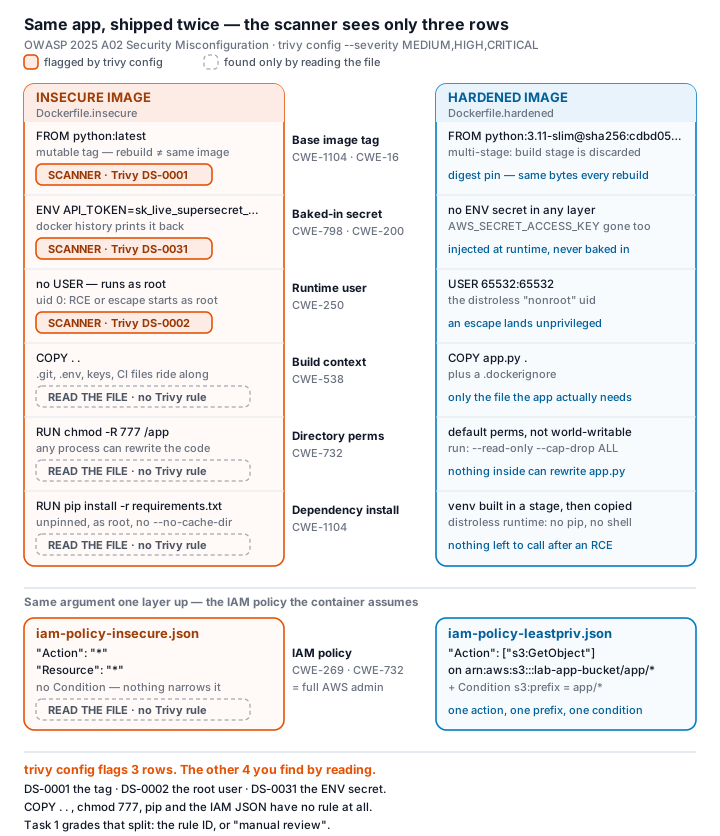
  2. iam-policy-insecure.json uses "Action": "*" and "Resource": "*". Describe why this violates least privilege and map it to CWE-732 vs CWE-269 — what is the difference between the two CWEs here?
  3. The insecure Dockerfile bakes ENV API_TOKEN=sk_live_.... Explain how an attacker recovers that secret from a shipped image (name the docker commands) and why this is CWE-798 / CWE-200.
  4. Why is FROM python:latest (CWE-1104/CWE-16) a security and reproducibility problem, and how does pinning to an @sha256: digest fix it?
  5. What does a distroless base image remove (relative to python:3.11-slim), and how does that shrink the attack surface for an RCE or container-escape attacker?

Part 3 — Hands-on Lab (180 min)

Learning goals: find cloud/container misconfigurations with Trivy, map each to a CWE, and rebuild the IAM policy + Dockerfile to least privilege / hardened so the findings drop.

Prerequisites: Docker installed and running; the week13-cloud-container/ lab folder; internet access to pull aquasec/trivy:latest.

Environment setup (real commands)

cd labs/week13-cloud-container

# Option A — the provided wrapper (trivy config over the Dockerfiles; IAM JSON is reviewed manually, see Task 2):
bash scan.sh

# Option B — run Trivy directly:
docker run --rm -v "$PWD:/src" aquasec/trivy:latest config --severity HIGH,CRITICAL /src

# (Optional) build + CVE-scan the hardened image:
docker build -f Dockerfile.hardened -t week13-hardened:lab .
docker run --rm -v /var/run/docker.sock:/var/run/docker.sock aquasec/trivy:latest image --severity HIGH,CRITICAL week13-hardened:lab

What to submit per task: the command(s) you ran + the relevant output (finding count or the specific finding line), a screenshot of the Trivy/terminal result, and a 2–3 sentence mitigation explaining why the fix reduces risk (cite the CWE).

Tasks

  • Task 0 — Onboarding (15 min). Confirm Docker works (docker version), run bash scan.sh, and record the baseline finding count against Dockerfile.insecure (Trivy's config scanner does not parse standalone IAM policy JSON, so iam-policy-insecure.json is reviewed manually instead — see Task 2). Deliverable: screenshot of the baseline scan.
  • Task 1 — Misconfig Hunt: container image (40 min). Goal: find every defect in Dockerfile.insecure. Steps: read each # DEFECT: comment, then locate the matching Trivy finding where one exists — only 3 of the 6 (unpinned :latest, runs as root, secrets in ENV) map to a Trivy config rule (DS-0001, DS-0002, DS-0031); COPY . ., chmod -R 777, and unpinned pip install are instruction-level RUN/COPY semantics Trivy's Dockerfile scanner doesn't check, so identify those 3 by code review instead. Build a table: defect → CWE → Trivy rule/severity (write "manual review — no Trivy rule" where none exists). Deliverable: completed table (6 rows) using the IDs from harden.md.
  • Task 2 — Misconfig Hunt: IAM (30 min). Goal: document why iam-policy-insecure.json is full-admin. Steps: identify the Action:* / Resource:* / no-Condition problems; map to CWE-269 / CWE-732. Deliverable: 3-row table + one sentence on the blast radius if these creds leak.
  • Task 3 — Secrets & storage (25 min). Goal: show secrets must not live in the image. Steps: explain how ENV API_TOKEN / AWS_SECRET_ACCESS_KEY are exposed via docker history; propose where they belong instead (secrets manager / mounted secret / orchestrator secret per harden.md). Deliverable: 2–3 sentence remediation + the .dockerignore entries you would add to stop COPY . . leaking .git/.env (CWE-538).
  • Task 4 — Hardened-Dockerfile + least-priv-IAM defense (50 min). Goal: prove the "after" is clean. Steps: (a) re-run bash scan.sh (or trivy config) against Dockerfile.hardened and capture the reduced finding count (Trivy's config scanner does not parse standalone IAM JSON, so confirm the IAM fix manually per Task 2 by diffing iam-policy-leastpriv.json against the insecure policy); (b) for the Dockerfile, point to the fix for each Task-1 defect (digest pin, multi-stage venv, distroless runtime, USER 65532:65532, no secrets in ENV, copy only app.py); (c) for IAM, confirm the rewrite scopes s3:GetObject to arn:aws:s3:::lab-app-bucket/app/* and adds the s3:prefix Condition; (d) list the extra runtime flags from harden.md (--read-only, --cap-drop ALL, --security-opt no-new-privileges). Deliverable: before/after finding counts, the defect→fix mapping, and the diffed policy/Dockerfile with one sentence per fix.
  • Task 5 — Flag tally (20 min). Goal: score the hunt. Steps: one flag per misconfig found and fixed (6 container + 3 IAM = 9). Deliverable: flag count + the single biggest-risk misconfig and why.

Part 4 — Reflection

  1. Mapping. For three findings, write the line of the artifact → CWE → OWASP 2025 A02, and the one-line fix.
  2. Real incident. Briefly describe a real breach caused by a cloud/container misconfiguration (e.g., a public S3 bucket leak, or an over-permissive IAM role). What single control from this lab would have prevented it?
  3. Best mitigation. Of everything you did, which control gives the most risk reduction per unit of effort, and why? Argue for least-privilege IAM vs. distroless+non-root.

Grading rubric (100)

ComponentPointsWhat earns full marks
Part 2 — Lecture questions20All 5 answered correctly with CWE/A02 reasoning
Part 3 — Tasks + evidence40Tasks 0–5 complete; commands, outputs, and screenshots present
Defense (Task 4 hardening)25Hardened Dockerfile + least-priv IAM shown to reduce findings; per-fix justification
Part 4 — Reflection15Accurate mapping, relevant incident, well-argued best mitigation

Evidence & Integrity (required)

  • Identity proof: every screenshot/diagram must show your **whoami / login email / student ID and a timestamp**. Generic or borrowed evidence is not accepted.
  • Personalized flag (if this lab issues one): ____________________

Flags are unique per student — submitting another student's flag is a violation. See SUBMISSION.md.

  • Explain in your own words (graded on your reasoning, not copied text):
  1. What did you do, and why did the vulnerability work?
  2. Why does your fix actually stop it — and what could still break it?

🤖 Audit the AI (required)

AI is a power tool you must distrust — you are graded on your critique, not the AI's answer.

  1. Ask an AI assistant to exploit or fix this week's vulnerability. Paste its full answer.
  2. Find what's wrong or risky in it — insecure code, a subtly incomplete fix, a hallucinated API/function/CVE, a missed edge case, or wrong reasoning. Quote the exact line(s).
  3. Produce the correct, verified version yourself and explain in 2–3 sentences why the AI's output was insufficient.

Disclose your AI use in the Part 1 table. This task counts toward your Defense + Reflection score.


🧠 Comprehension & Prompt (required)

A. Explain in Plain English (EiPE). In 2–3 sentences, in your own words, describe what this week's vulnerable code/endpoint actually does and why it is exploitable — explain the mechanism, don't dump jargon.

B. Prompt Problem. Write a single prompt that makes an AI produce a correct, secure fix for one finding. Run it: does the exploit now fail? If not, refine the prompt and try again. Submit the final prompt + the verified result. Graded on the prompt's precision and your verification — this trains problem decomposition and AI literacy (Denny et al. 2024).