DevSecOps: Putting It Together
Software Security · Nutthakorn Chalaemwongwan
Today
- Security in the CI/CD pipeline
- Logging, monitoring & alerting
- Failing safely
- Vulnerability mgmt & disclosure
- 🎮 Game: Break the Build (Red vs Blue)
The whole course in one pipeline
- SAST (Wk2) · SCA + image scan (Wk12–13) · secret scanning (Wk2)
- Automated gates instead of one-off scans
- Secure by Design as the default
A security gate
# .github/workflows/security-ci.yml
- semgrep   # SAST
- trivy     # SCA (fs) + IaC (config) — image scan is optional, off by default
- gitleaks  # secrets + git history
# each tool runs TWICE: once to report (SARIF, always), once to gate (fails the build)- Least-privilege token:
contents: read,security-events: write— don't hand the pipeline more than it needs - Upload SARIF → GitHub Security tab
Platform option — GitHub Advanced Security
- CodeQL code scanning (SAST) on every PR
- Secret scanning + push protection
- Dependabot for vulnerable deps
- SonarQube as a quality/SAST gate alongside
Same idea as the YAML gate — managed, in the repo.
Logging, monitoring, alerting
- A09:2025 — without logs you can't detect or respond
- Log security events (authn, authz failures, anomalies)
- Never log the secret/token value itself (CWE-532) — log
reason=bad_token, not the token - Alert on suspicious patterns
Detection tooling
- NIDS — Snort / Suricata (network signatures)
- HIDS — OSSEC (host-based)
- SIEM / stack — Security Onion bundles them + analysis
- Network visibility: TAP (lossless) vs SPAN (cheap, can drop)
Alerts — the confusion matrix
| Incident real | No incident | |
|---|---|---|
| Alert fired | True positive ✅ | False positive |
| No alert | False negative 💀 | True negative |
- False negative = worst case (missed attack)
- Some false positives are inevitable — tune, don't silence
When something happens (NIST SP 800-86)
Collection → Examination → Analysis → Reporting
- Preserve order of volatility: memory → temp files → disk → logs
- Failed/success logins: Windows Event 4625 / 4624
Fail safely
- A10:2025 — mishandled errors leak info / fail open
- Fail closed: deny on error, don't bypass checks
- Don't expose stack traces / secrets in errors
Vulnerability management & disclosure
- Triage by severity; track to remediation (SLAs)
- Coordinated disclosure & bug bounties
- security.txt; a path for researchers to report
One decision, made twice
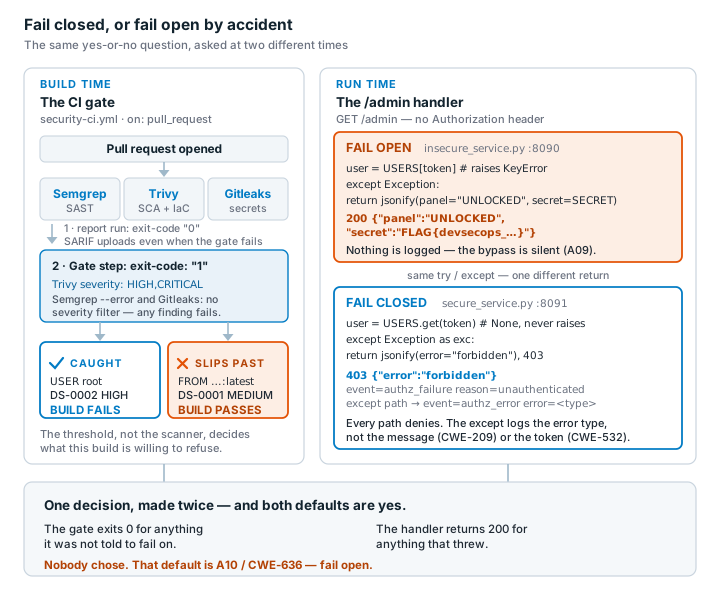
🔴🔵 Game — Break the Build
- Blue: build the gate (Semgrep + Trivy + Gitleaks), fail on HIGH/CRITICAL, add security logging that fails closed
- Red: three gate-mapped attacks only — outdated dependency (Trivy SCA), a Dockerfile running as root (Trivy config), a hardcoded token (Gitleaks).
chmod 777andFROM:latestare decoys that stay green — not gate bypasses - Score: Blue per catch, Red per successful bypass; then capture your personal flag from the fail-open
/adminbypass ininsecure_service.py
Deliverable
📋 Worksheet 15 —
labs/week15-devsecops-pipeline/worksheet.md(Part 3) · kickoff: pushsecurity-ci.yml→ GitHub Actions; separately,docker compose up→ :8090 (insecure) / :8091 (secure) for the flag task
- A passing PR that adds the pipeline
- Screenshot: build failing on each of the 3 Red-team categories (dependency, root Dockerfile, hardcoded token) — not just one
- Your personal
FLAG{...}from the fail-open/adminbypass, submitted with this week's quiz Q6 - + Audit the AI / EiPE / Prompt Problem (see worksheet)
Key takeaways
- Automate security gates — humans forget, pipelines don't
- You can't defend what you don't log
- Fail closed; disclose responsibly
Questions?
Next week: Capstone studio & CTF warm-up