Course: Software Security (KOSEN69) · Week 4 Aligned: OWASP 2025 A05 Injection · CWE-89 (SQLi), CWE-78 (OS command injection), CWE-434 (unrestricted upload) Signature game: 🐉 SQLi Warm-up — each successful injection lands a "hit"; you clear it when you dump every credential and land an RCE.
⚠️ Ethics note: All payloads here are for the provided sandbox (
vulnerable_app.py) and your own DVWA/Juice Shop containers only. Never test systems you do not own or have written permission to test. Unauthorized injection is a crime under most computer-misuse laws.
Part 1 — Student Information
| Name | Student ID | Date | Group |
|---|---|---|---|
Part 2 — Lecture Questions
Answer in 2–4 sentences each.
- Why does a parameterized query (
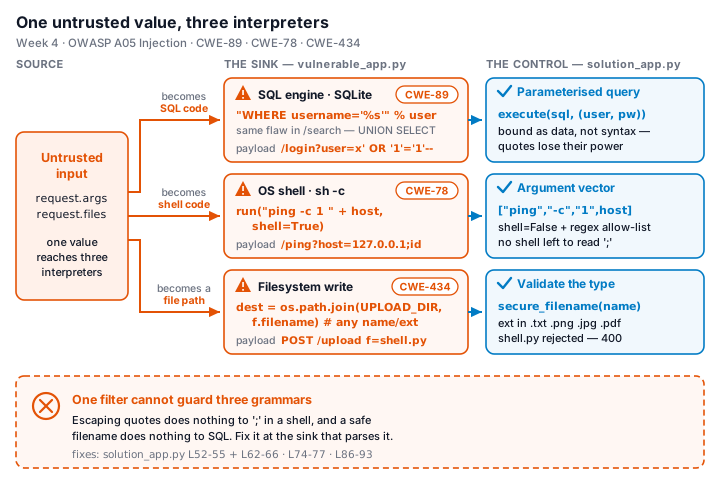
execute(sql, (params,))) defeat SQL injection, while string formatting ("... '%s'" % user) does not? Reference how the database treats data vs. code. - In the
/pingendpoint,subprocess.run("ping -c 1 " + host, shell=True)is vulnerable. Explain howshell=Trueturns user input into CWE-78, and how an argument array (["ping","-c","1",host]) removes the shell. - Distinguish input validation (allow-list) from output handling. Why is validation alone insufficient defense for SQLi?
- The
/uploadroute saves any filename to disk (CWE-434). What two properties must a directory and a filename have for an upload to become remote code execution, and which doessolution_app.pyremove? - What is a UNION-based SQLi, and why must the injected
SELECTreturn the same number of columns as the original query? Relate to/search?q=' UNION SELECT username,password FROM users--.
Part 3 — Hands-on Lab (150 min)
Learning goals: extract data via SQLi, achieve OS command injection, exploit an unrestricted upload, then prove each fix in solution_app.py blocks the payload.
Prerequisites: Docker + Docker Compose, curl, a browser. Working dir: labs/week04-injection/.
Environment setup
cd labs/week04-injection
docker compose up            # builds python:3.12-slim, installs flask, runs vulnerable_app.py
# vulnerable app -> http://localhost:8080   (service name: injection-lab, port 8080)
Optional secondary targets:
docker run --rm -it -p 80:80 vulnerables/web-dvwa        # DVWA  -> http://localhost
docker run --rm -p 3000:3000 bkimminich/juice-shop       # Juice Shop -> http://localhost:3000
What to submit per task: the exact payload/command, a screenshot of the response proving success, and a 2–3 sentence mitigation in your own words.
Task 0 — Onboarding (5 min). Browse to http://localhost:8080/login?user=alice&pw=alicepw and confirm Welcome alice. Note the seeded users (alice, bob). Screenshot the working app. Deliverable: screenshot.
Before you start — see why concatenation is the flaw 🔬 Type any input and watch which characters the database will parse as SQL rather than as a name. The point is not the payload; it is that with concatenation the input becomes syntax, and with a parameterised query it structurally cannot. You will be asked to state that difference in your own words in Task 5.
Task 1 — Auth bypass via SQLi (25 min) 🐉 Hit #1.
- Goal: log in as
alicewith no valid password. - Steps: hit
/login?user=alice'--&pw=x, then/login?user=x' OR '1'='1'--&pw=x(the trailing--is required: without it, SQL bindsANDtighter thanOR, so... OR '1'='1' AND password='x'matches no row). Observe the comment in the query at lines 61–63 ofvulnerable_app.py. - Note — browser vs
curl: pasted into a browser, the space inx' OR '1'='1'--is encoded for you; withcurlan unencoded space silently returns a blank page (no error). Usecurl -G "http://localhost:8080/login" --data-urlencode "user=x' OR '1'='1'--" --data-urlencode "pw=x"— same-G --data-urlencodeform for Task 2'sq=. - Deliverable: both URLs + screenshot of
Welcome alice+ explain why--andOR '1'='1work.
Task 2 — Credential dump via UNION SQLi (30 min) 🐉 Hit #2.
- Goal: exfiltrate every username and password from the
userstable. - Steps: request
/search?q=' UNION SELECT username,password FROM users--. Confirmalice:alicepwandbob:bobpwappear. - Deliverable: payload + screenshot of dumped credentials + note on why column count must match.
Task 3 — OS command injection (30 min) 🐉 Hit #3.
- Goal: run an arbitrary command through
/ping, then read this lab's command-injection flag with it. - Steps: request
/ping?host=127.0.0.1;idthen/ping?host=127.0.0.1;whoami(URL-encode if needed). Capture the injected command's output. Then use the same injection to read the flag file the server keeps at/flag.txt(the space needs--data-urlencode, see the note on Task 1):
curl -G "http://localhost:8080/ping" --data-urlencode "host=127.0.0.1;cat /flag.txt"- Deliverable: the three payloads + screenshot of the
id/whoamioutput and theFLAG{...}from/flag.txt+ explanation of theshell=Trueflaw (CWE-78).
Task 4 — Unrestricted upload (25 min) 🐉 Hit #4.
- Goal: show the upload accepts a dangerous file type with no checks (CWE-434).
- Steps:
GET /upload(form), then upload a file namedshell.py. Confirmsaved to /tmp/uploads/shell.py. Via the browser form this just works; viacurlthe file field is namedf:curl -F "f=@shell.py" "http://localhost:8080/upload". Discuss: ifUPLOAD_DIRwere web-served or executed, this is the RCE chain (here the dir is not served, so document the missing control rather than claiming auto-RCE). - Deliverable: upload command/screenshot + 2–3 sentences on why extension allow-listing matters.
Task 5 — Defend / fix it (35 min) 🛡️ Warm-up cleared.
- Goal: prove
solution_app.pyblocks Tasks 1–4. - Steps: stop the vulnerable container (
Ctrl-C), then run the fixed app on the same compose env:
docker compose run --rm --service-ports injection-lab bash -c "pip install --no-cache-dir flask && python solution_app.py"Re-fire each payload from Tasks 1–4. Expected: Login failed, no credential dump, invalid host (400) on 127.0.0.1;id, and file type not allowed for shell.py.
- Deliverable: screenshots of all four failures + name the fix line for each (parameterized query L52–55 login / L62–66 search,
shell=False+regex L74–77,secure_filename+allow-list L86–93).
Part 4 — Reflection
- CWE/OWASP mapping: map each of your four exploits to its CWE (89/78/434) and to OWASP 2025 A05 Injection.
- Real breach: the 2017 Equifax breach exposed ~147M people after attackers exploited a known input-handling flaw (Apache Struts CVE-2017-5638). In 3–4 sentences, connect that failure to the lessons in this lab (untrusted input reaching a powerful interpreter; the cost of an unpatched/unvalidated input path).
- Best mitigation: of parameterized queries, allow-list validation, least privilege, and avoiding
shell=True, which single control would have prevented the most damage in this lab, and why?
Grading rubric (100)
| Criterion | Points |
|---|---|
| Part 2 — Lecture questions (conceptual accuracy) | 20 |
| Part 3 — Exploitation + evidence (payloads + screenshots, Tasks 1–4) | 40 |
| Part 3 — Defense (Task 5: fixes proven, lines cited) | 25 |
| Part 4 — Reflection (CWE/OWASP mapping, breach, mitigation) | 15 |
| Total | 100 |
Evidence & Integrity (required)
- Identity proof: every screenshot/diagram must show a terminal running
printf '%s | %s | ' "$(whoami)" '<YOUR-STUDENT-ID>'; date '+%F %T %Z'in the same image as the evidence. When the evidence is a browser page, a DevTools panel or a rendered response, put that terminal beside the browser and capture the whole screen — a cropped window carries nothing that identifies you, and the lab's own output is byte-identical for the whole cohort by design, so the stamp is the only thing that makes the shot yours. Generic or borrowed evidence is not accepted. - Personalized flag (if this lab issues one): ____________________ Flags are unique per student — submitting another student's flag is a violation. How to submit: learn.zcr.ai/submit (full guide:
SUBMISSION.mdin the repo root). - Explain in your own words (graded on your reasoning, not copied text):
- What did you do, and why did the vulnerability work?
- Why does your fix actually stop it — and what could still break it?
🤖 Audit the AI (required)
AI is a power tool you must distrust — you are graded on your critique, not the AI's answer.
- Ask an AI assistant to exploit or fix this week's vulnerability. Paste its full answer.
- Find what's wrong or risky in it — insecure code, a subtly incomplete fix, a hallucinated API/function/CVE, a missed edge case, or wrong reasoning. Quote the exact line(s).
- Produce the correct, verified version yourself and explain in 2–3 sentences why the AI's output was insufficient.
Disclose your AI use in the Part 1 table. This task counts toward your Defense + Reflection score.
🧠 Comprehension & Prompt (required)
A. Explain in Plain English (EiPE). In 2–3 sentences, in your own words, describe what this week's vulnerable code/endpoint actually does and why it is exploitable — explain the mechanism, don't dump jargon.
B. Prompt Problem. Write a single prompt that makes an AI produce a correct, secure fix for one finding. Run it: does the exploit now fail? If not, refine the prompt and try again. Submit the final prompt + the verified result. Graded on the prompt's precision and your verification — this trains problem decomposition and AI literacy (Denny et al. 2024).