Injection & Input Handling
Software Security · Nutthakorn Chalaemwongwan
Today
- Why injection is still #1-class of bug
- The general injection pattern
- SQL injection — hands-on
- Command injection
- Defenses: parameterized queries + validation
- 🎮 Game: SQLi Warm-up
Recap — Week 3
- Crypto failures: ECB, weak hashes, hardcoded keys
- Hashing ≠ encryption ≠ encoding
- Use vetted KDFs (bcrypt/argon2) + authenticated encryption
The injection pattern (one idea)
Untrusted data gets interpreted as code/commands.
- Attacker input crosses a trust boundary into an interpreter
- SQL, OS shell, LDAP, XPath, template engines, NoSQL…
- Maps to OWASP A05:2025 Injection
SQL injection — how it works
-- vulnerable (this week's app.py, SQLite)
"SELECT * FROM users WHERE username = '" + input + "'"- Input
' OR '1'='1→ always true - UNION-based → read other tables in one shot (today's lab)
- Stacked queries (
'; DROP TABLE users; --) are the textbook example, but don't assume they work everywhere — Python'ssqlite3refuses multiple statements in oneexecute()call; this week's target raises an error instead
Try it — watch the parse tree change
Type an input. See exactly where the quote breaks out of the string.
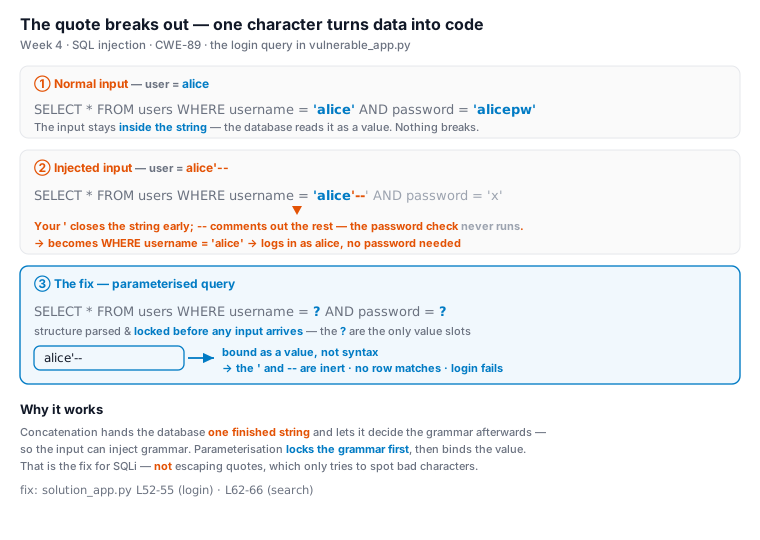
Auth bypass — anatomy of one payload
Inject into the username field:
alice'--SELECT * FROM users WHERE username = 'alice'--' AND password = '...';'closes the string literal you're injected into--comments out everything after it, including the password check- No trailing space, no
LIMITtrick needed — this app is SQLite viafetchone(), not a MySQL row-count gate; don't carry over MySQL-specific folklore ("needs a space after--") — that's a different engine's quirk
The fix: parameterize — data stays data
# concatenation: DB gets ONE finished string, decides grammar AFTER
"...WHERE username = '" + user + "'"     # user = alice'--  ->  ' breaks out, code

# parameterized: structure parsed and LOCKED first, value bound AFTER
db.execute("...WHERE username = ? AND password = ?", (user, pw))?locks the query structure before the input ever arrivesalice'--is then bound as a value — it can no longer become SQL grammar- Escaping quotes patches symptoms; this is the actual fix for SQLi
SQLi in one picture — break-out vs. bound value
Real-world impact
- Equifax (2017): unvalidated HTTP header → Struts RCE (CVE-2017-5638); 147M people, ~$700M settlement
- Heartland (2008): SQLi into payment systems → 130M+ cards
- Bulgaria: data on almost all adults leaked via SQLi
- Impact: data leak/modification, full DB control, DoS, reputation
Validate: allow-list, not block-list
- Allow-list (preferred): accept only known-good (e.g.
0–9for a phone) - Block-list: ban known-bad → bypassed by new payloads
- Validate type · length · range · format
- Client-side for UX, server-side for security
Demo / attack surface
- Login forms, search boxes, URL params, JSON fields, headers
- Error messages leak schema → enumeration
- Today's lab: raw payloads via browser/curl against
app.py— no scanner needed to see the mechanism - Burp Suite /
sqlmapare real-world tools worth knowing (sandbox-only, ethically) — not required for this week's tasks
Command injection
system("ping -c 1 " . $_GET['host']);   // vulnerable
// host = 8.8.8.8; cat /etc/passwd- Shell metacharacters:
; | & $() \>` - Leads to RCE — full server compromise
The fix: no shell — pass an argument vector
# vulnerable: shell=True -> the OS shell parses the whole string
subprocess.run("ping -c 1 " + host, shell=True)     # host = 8.8.8.8;cat /flag.txt

# fixed: shell=False + argument array -> no shell, no metacharacters
subprocess.run(["ping", "-c", "1", host], shell=False) # + allow-list hostshell=Truehands your string to/bin/sh, which reads;|$()as syntax- An arg vector runs
pingdirectly —hostis one literal argument, never parsed 8.8.8.8;cat /flag.txtbecomes one impossible "hostname"; the;is inert
Upload → RCE (a classic chain)
The classic chain, attacker uploads shell.php:
<?php system($_GET['cmd']); ?>- If the upload dir is web-served and PHP-executable:
.../uploads/shell.php?cmd=ls%20-l→ RCE - This week's lab stops one step earlier: CWE-434 unrestricted upload — the app accepts any file type/extension, but the upload directory is not served or executed. Your task: explain which missing control would complete the chain (type check, extension allow-list, storage outside web root, no-exec) — not demonstrate a live shell
- Fix: validate file type via
mime_content_type(), allow-list extensions, store uploads outside web root, no execute
CWE mapping
- CWE-89 — SQL injection
- CWE-78 — OS command injection (CWE-77 is its general parent — cite CWE-78, the specific one)
- CWE-434 — unrestricted upload of a dangerous file type
Defenses that actually work
- Parameterized queries / prepared statements (the fix for SQLi)
- ORM with bound parameters
- Allow-list input validation (type, length, format)
- Avoid shells: use exec APIs with arg arrays, not string concat
- Least-privilege DB accounts
One value, three interpreters
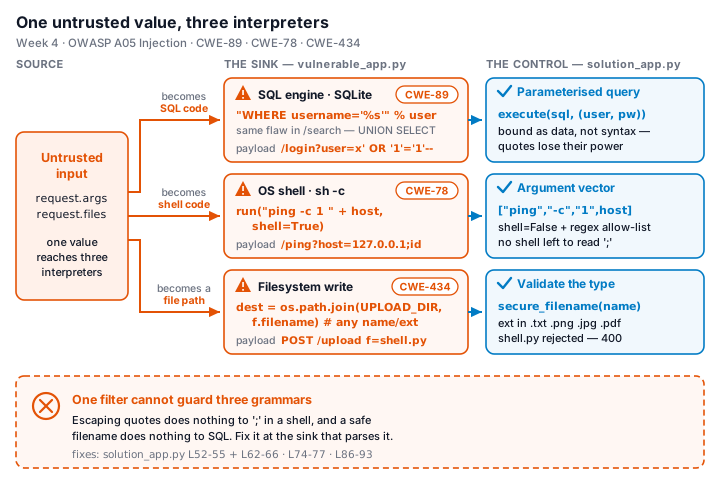
- SQL (
WHERE username = <in>) → parameterized query — bind the value - Shell (
ping … <in>) → argument vector +shell=False— no shell to parse it - Filesystem (
save(<in>)) → extension allow-list + store outside web root - One filter can't guard three grammars — fix at each sink, not at the source
⚔️ Game — SQLi Warm-up
Four hits against this week's own app — no filters to bypass, the app has none:
- Auth bypass (
alice'--) - UNION dump (steal all credentials)
- Command injection
- Unrestricted upload
- Warm-up cleared: run
solution_app.py, prove all four attacks now fail, cite the exact fix line for each
Lab steps
📋 Worksheet 4 —
labs/week04-injection/worksheet.md(Part 3) · kickoff:docker compose up→ http://localhost:8080
docker run --rm -p 80:80 vulnerables/web-dvwa # optional extra target (or Juice Shop)- Find an injectable parameter, bypass auth
- Extract data (UNION dump)
- Achieve command injection
- Probe the upload endpoint — document the missing control
- Rewrite the endpoints safely & re-test
Deliverable
- Findings: each injection point + payload + impact (CWE-mapped)
- The fixed code (prepared statements / validation)
- Proof the payload no longer works
- + Audit the AI / EiPE / Prompt Problem (see worksheet)
Key takeaways
- Never build interpreter strings from untrusted input
- Parameterize first; validate as defense-in-depth
- Injection = data treated as code
Questions?
Next week: XSS & client-side risks