Course: Software Security (KOSEN69) · Week 12 Aligned: OWASP 2025 — A03 Software Supply Chain Failures · A08 Software or Data Integrity Failures · CWE: CWE-1104, CWE-829, CWE-1357, CWE-1395 Signature game: 📦 Dependency Confusion Heist Ethics note: This lab has no live private/public registry to attack — the dependency-confusion exercise is a controlled walkthrough (
dependency-confusion.md) plus the interactive resolver simulation in Task 2, not a real package pull. Never plant or publish look-alike packages on the real PyPI or npm — that is an attack on every downstream user, and nothing in this lab requires it.
Part 1 — Student Information
| Name | Student ID | Date | Group |
|---|---|---|---|
Part 2 — Lecture Questions
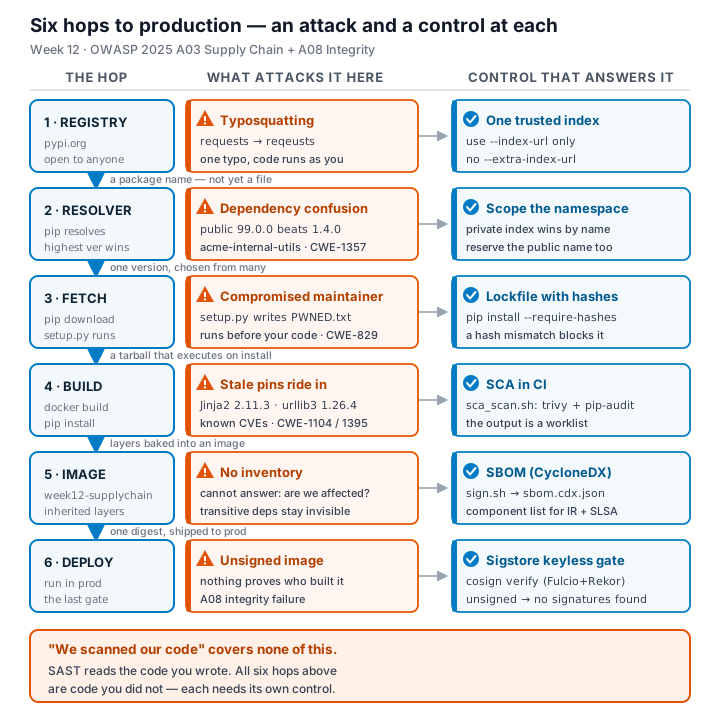
- Explain dependency confusion (substitution). Why does a public
acme-internal-utils==99.0.0win over a private==1.4.0when a resolver shops both indexes? - How does typosquatting (
reqeusts,urlib3) achieve code execution at install time before any of your code runs? - What is an SBOM (CycloneDX/SPDX) and why is it a prerequisite for both incident response and SLSA provenance?
- Sigstore keyless signing uses Fulcio (CA) + Rekor (transparency log) tied to an OIDC identity. Why is that safer than a long-lived private key (CWE-321)?
- Summarize the SLSA levels. Which level does "signed artifact + SBOM + provenance gate before deploy" put you at, and what is still missing?
Part 3 — Hands-on Lab (150 min)
Learning goals: Run SCA on intentionally-outdated dependencies, generate an SBOM, sign/verify an image, and defend against dependency confusion.
Prerequisites: Docker; the lab folder (requirements.txt, Dockerfile, app.py, sca_scan.sh, sign.sh). For signing: browser for the OIDC flow + registry push access.
Environment setup
cd labs/week12-supply-chain
bash sca_scan.sh                 # trivy fs + pip-audit on requirements.txt (+ optional image scan)
docker build -t week12-supplychain:lab .
bash sign.sh week12-supplychain:lab   # CycloneDX SBOM -> sbom.cdx.json, then cosign sign + verify
What to submit per task: the exact command(s) + output, a screenshot, and a 2–3 sentence remediation note mapping the finding to A03/A08 or the CWE.
Task 0 — Onboarding (15 min)
Read requirements.txt and list the pinned packages with their versions. Note why they are intentionally outdated (each is deliberately an old release so SCA tools flag its known CVEs). Deliverable: the package/version table + which OWASP/CWE this maps to.
Task 1 — SCA scan: build the remediation worklist (35 min)
Goal: Flag the known-vulnerable dependencies — A03. Steps:
bash sca_scan.sh— read thetrivy fstable (CVE, installed vs. fixed version) and thepip-auditadvisory IDs (GHSA-/PYSEC-).- Pick three findings; record CVE/advisory id, severity, and the fixed version. Deliverable: the SCA output + a 3-row remediation table (package → current → fixed).
Task 2 — Dependency Confusion Heist (35 min)
Goal: Watch the wrong package win — A03 / CWE-1357.
Reality check: this lab does not stand up a live private/public registry. acme-internal-utils is a worked example, not an installable package — there is nothing to actually pip install here (the name doesn't exist on real PyPI either, so don't expect that to work as a shortcut). Task 2 is a controlled walkthrough of the resolver's own rule, using the simulation below, which computes the real "highest version wins" logic live instead of just asserting the outcome.
Steps:
- Read
dependency-confusion.md's "Dependency confusion (substitution)" section for the mechanism. - In the simulation, load the "the attack" preset (private
1.4.0, public99.0.0, merged /--extra-index-urlmode) and record which index the resolver picks and why. - Keep the same version numbers and switch to the single-index (
--index-url) mode; record how the verdict changes — this is the resolver behavior Task 4's "single trusted index" defense relies on. - Try the "win the race" preset (private version numerically higher than public) and note why the sim's own explanation calls that "not a defense."
Deliverable: a screenshot of the simulation's verdict in both index modes (merged vs. single) for the same version pair, plus one sentence on why an attacker defeats the "keep my internal version number high" idea.
Task 3 — SBOM + signing/verification (30 min)
Goal: Produce a component inventory and prove integrity — A08. Steps:
- After
bash sign.sh week12-supplychain:lab, opensbom.cdx.jsonand find Flask's entry. - Read the
cosign verifyPASS for the signed image. - Negative test on an unsigned image (it must fail):
cosign verify --certificate-identity-regexp '.*' --certificate-oidc-issuer-regexp '.*' python:3.9-slim→Error: no signatures found. (Both--certificate-identity*flags are required in keyless mode; without them cosign stops atError: --certificate-identity or --certificate-identity-regexp is required— a usage error, which is not the same thing as proving the image is unsigned.) Deliverable: the SBOM Flask component entry + the verify PASS + the negative-test failure.
Task 4 — Defend / fix it (35 min)
Goal: Stop dependency confusion and lock integrity — defenses from dependency-confusion.md + sign.sh. Steps:
- Pin + hashes: run
pip install --require-hashes -r requirements.txtagainst this lab's ownrequirements.txt(it has no hashes yet) and record pip's refusal —ERROR: Hashes are required in --require-hashes mode...plus the--hash=sha256:…line pip prints for you. That refusal is the same mechanism that would block a real confusion substitution: once hashes are required, a package that doesn't match — from either index — cannot install silently. - Single trusted index: use one
--index-urlinstead of--extra-index-url; explain why the resolver stops shopping around (tie this back to Task 2's single-index verdict). - Namespace scoping: describe reserving/namespacing the internal package name.
- Provenance gate: state how the
cosign verifyfromsign.shbecomes a gate before a simulated deploy. Deliverable: the--require-hashesrefusal output (step 1) + the simulation's before/after verdict for merged vs. single index (from Task 2) + the one defense you found most effective and why.
Part 4 — Reflection
- Mapping: table — finding | tool (
sca_scan.sh/sign.sh) | OWASP 2025 id | CWE | fix. - Real breach: analyze the XZ Utils backdoor (CVE-2024-3094). Which OWASP/CWE applies, and would an SBOM + signing + provenance gate have caught a maliciously-modified upstream dependency? (Compare with SolarWinds or Log4Shell if useful.)
- Best mitigation + SLSA self-assessment: one paragraph — which SLSA level your defenses reach and why, and the single highest-leverage control for your team.
Grading rubric (100)
| Criterion | Weight |
|---|---|
| Lecture questions (Part 2) | 20 |
| Exploitation + evidence (Tasks 1–3: SCA findings, confusion proof, SBOM/verify) | 40 |
| Defense (Task 4: pinning/hashes, single index, scoping, provenance gate) | 25 |
| Reflection (Part 4: mapping, XZ breach, SLSA self-assessment) | 15 |
| Total | 100 |
Evidence & Integrity (required)
- Identity proof: every screenshot/diagram must show a terminal running
printf '%s | %s | ' "$(whoami)" '<YOUR-STUDENT-ID>'; date '+%F %T %Z'in the same image as the evidence. When the evidence is a browser page, a DevTools panel or a rendered response, put that terminal beside the browser and capture the whole screen — a cropped window carries nothing that identifies you, and the lab's own output is byte-identical for the whole cohort by design, so the stamp is the only thing that makes the shot yours. Generic or borrowed evidence is not accepted. - Personalized flag (if this lab issues one): ____________________ Flags are unique per student — submitting another student's flag is a violation. How to submit: learn.zcr.ai/submit (full guide:
SUBMISSION.mdin the repo root). - Explain in your own words (graded on your reasoning, not copied text):
- What did you do, and why did the vulnerability work?
- Why does your fix actually stop it — and what could still break it?
🤖 Audit the AI (required)
AI is a power tool you must distrust — you are graded on your critique, not the AI's answer.
- Ask an AI assistant to exploit or fix this week's vulnerability. Paste its full answer.
- Find what's wrong or risky in it — insecure code, a subtly incomplete fix, a hallucinated API/function/CVE, a missed edge case, or wrong reasoning. Quote the exact line(s).
- Produce the correct, verified version yourself and explain in 2–3 sentences why the AI's output was insufficient.
Disclose your AI use in the Part 1 table. This task counts toward your Defense + Reflection score.
🧠 Comprehension & Prompt (required)
A. Explain in Plain English (EiPE). In 2–3 sentences, in your own words, describe what this week's vulnerable code/endpoint actually does and why it is exploitable — explain the mechanism, don't dump jargon.
B. Prompt Problem. Write a single prompt that makes an AI produce a correct, secure fix for one finding. Run it: does the exploit now fail? If not, refine the prompt and try again. Submit the final prompt + the verified result. Graded on the prompt's precision and your verification — this trains problem decomposition and AI literacy (Denny et al. 2024).